Flight planning · Filing · Briefing

Plan it. Brief it. File it.

BRIEF takes a flight from route to ramp. Build VFR, IFR and mixed flights, file straight to EUROCONTROL, and hand your crew a briefing pack signed by the PIC.

AOCsFlight schoolsAir clubsCorporate & private pilots
W&B WITHIN LIMITS
IFPS VALIDATED
See it in action

BRIEF in three minutes

From the flight board to a filed flight plan: IFR routing, weather, weight & balance, risk assessment and boarding passes.

2:52 explainerCaptions in English and GreekPrefer a walkthrough? Watch the how-to
How it works

Three steps from idea to airborne

AviBRIEF follows the way you already prepare a flight. You just do each step once.

01 / PLAN

Plan

Choose VFR, IFR or mixed rules. Pick your aircraft, crew and passengers, then build or reuse a saved route.

  • Routes with waypoints and intermediate stops
  • Fuel, endurance and leg times worked out for you
  • Weight & balance checked for every leg
02 / FILE

File

IFR routes are checked against EUROCONTROL before you file. VFR plans go to the right AFTN addresses automatically.

  • IFPS validation with clear error messages
  • File now, or schedule it for a set UTC time
  • Quick FPLs for one-off flight plans
03 / FLY

Fly

Get one briefing pack with the paperwork, the weather and the NOTAMs. Sign it, print it and go.

  • GenDec, Form 731, ICAO FPL and W&B PDFs
  • GRAMET, METAR/TAF and NOTAMs
  • Boarding passes for your passengers
Every kind of flight

VFR, IFR, or both in one plan

Pick how the flight will be flown. AviBRIEF changes the route builder, the checks and where the plan is filed to match.

VFR

Visual Flight Rules

  • Draw your own route with waypoints
  • Any altitude, no alternate required
  • Filed to the route's AFTN addresses
IFR

Instrument Flight Rules

  • Airway routes checked by EUROCONTROL
  • Flight level, alternate and performance data
  • Filed to IFPS (EUROCONTROL)
Y/Z

Mixed VFR / IFR

  • Depart VFR and join IFR en route (Z), or the reverse (Y)
  • The IFR portion is checked by EUROCONTROL
  • Filed to IFPS and to the VFR ATS units
The briefing pack

All the paperwork in one signed pack

BRIEF fills in each document from the flight you already built, so nothing gets typed twice. Generate the pack when you need it, or schedule it to be ready before departure.
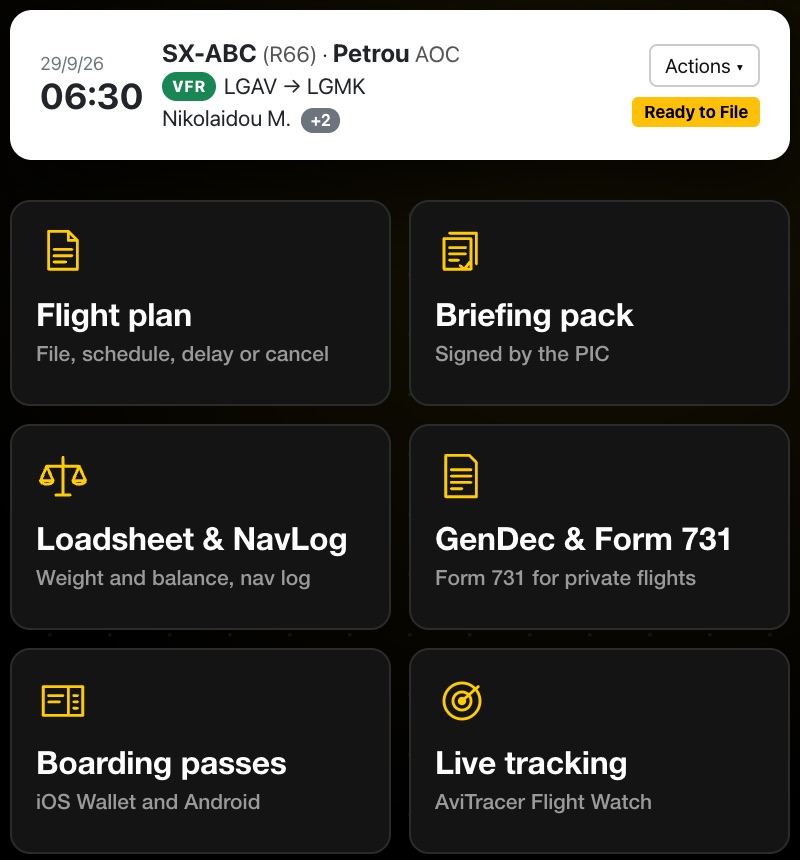
  • General Declaration, with crew and passenger manifests
  • Form 731 for flights in Greece, including cost sharing
  • Weight & balance for every leg
  • Weather and NOTAMs: GRAMET cross-section, METAR/TAF and NOTAMs along the route
  • Signed digitally: send crew a link to sign from any device
  • Direct Print: send one document or every page, NOTAMs included, straight to the printer from the Actions menu
BRIEF actions for one flight: flight plan, briefing pack, loadsheet and NavLog, GenDec and Form 731, boarding passes and live tracking
Built for operators

One place for your fleet, crew and passengers

Save your aircraft, people and routes once. Every new flight starts from them.

Aircraft profiles

Performance, fuel burn, W&B profile, equipment codes and IFR/PBN capabilities, saved for each tail number.

Crew & teams

Invite pilots and student pilots to your team. They can sign briefing packs from any device.

Passengers & boarding

Store ID and passport details once. Issue boarding passes and track embarkation for each leg.

Reusable routes

Save routes with intermediate stops and waypoints. Reverse one with a click. AFTN addresses are found for you.

\1Set the flight plan to file, and the briefing pack to build, at a UTC time you choose. Send passengers a live tracking link with ETA.\2

Risk assessment

Each flight gets a risk assessment based on your own SOP, with known fields already filled in. Filing can require the PIC's or instructor's signature.

Passenger experience

Boarding passes passengers will like

Charter and tour operators can give every passenger a clean boarding pass and keep track of who has boarded.
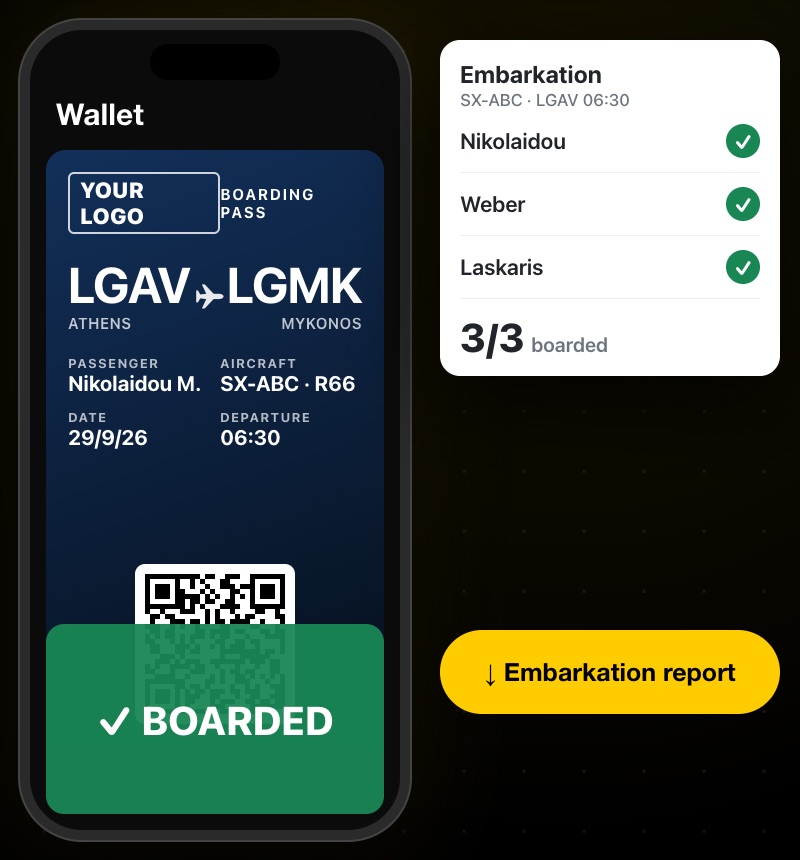
  • A pass for each leg, with boarding time in UTC
  • Embarkation status with a report you can download
  • Passenger weights go straight into W&B and the Field 18 remarks
A BRIEF boarding pass in the phone wallet next to the embarkation list showing three of three passengers boarded
Weight & balance

Who sits where, and what it does to the CG

The loadsheet works for aeroplanes and helicopters, from the R22 to the H145. Change something at the last minute and it is checked again.
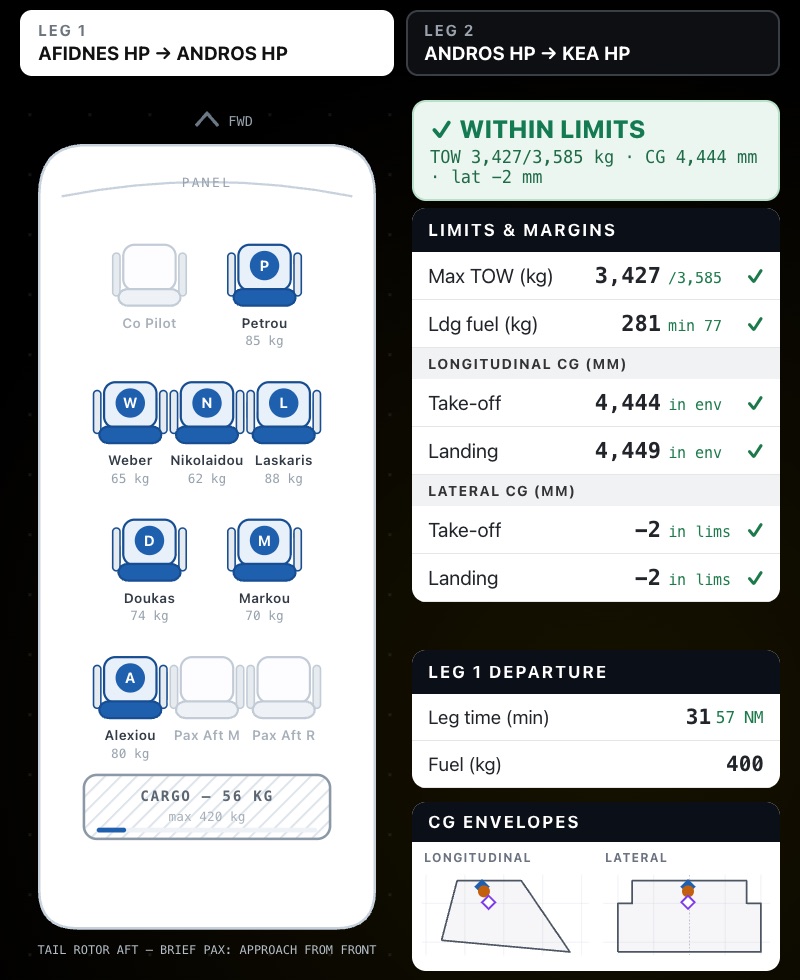
  • Take-off mass, landing fuel and CG checked at take-off and landing
  • Lateral envelope for helicopters
  • A loadsheet for every leg of a multi-stop flight, including passengers who get off along the way
BRIEF helicopter seating plan with passenger weights, next to limits and margins showing the flight within limits
Risk assessment & training

No signature, no filing

Every new flight gets a risk assessment that follows your own SOP, emailed to the PIC with the known fields filled in. Schools get training records and solo supervision on the same flight.
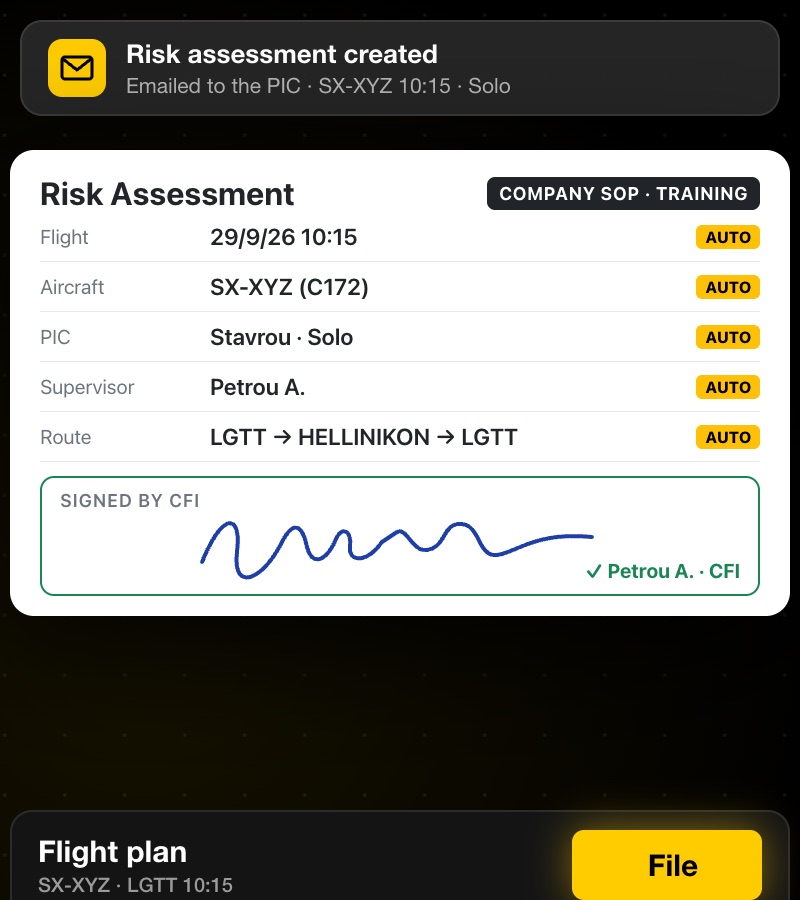
  • Scored risk levels with required actions, for AOC and training
  • Filing can wait for a signature from the PIC or the instructor
  • Training records: lesson, exercises, scores and evaluation, signed with the flight
  • One-click reminders for unsigned risk assessments and training records

More on risk and training →

A BRIEF risk assessment for a solo training flight, signed by the PIC, with the File button below
Simple pricing

Pay only for the flights you file

No monthly fee. Buy credits when you need them. They never expire, and aircraft, crew, passengers and routes are unlimited.

Basic

For private pilots and light use.

€24.99one-off

45 credits · €0.56 per credit

See details
FAQ

Common questions

Who is AviBRIEF for?

Private pilots, flight schools, and helicopter and fixed-wing operators who want to plan, file and brief flights in one place. It handles VFR, IFR and mixed Y/Z flights.

How does filing to EUROCONTROL work?

For IFR flights and the IFR part of Y/Z flights, AviBRIEF builds the route with EUROCONTROL and checks it with IFPS before you file. Any errors are shown so you can fix them before filing. VFR plans are sent to the AFTN addresses AviBRIEF works out for the route.

What does a credit buy?

Filing a flight plan costs 1 credit. Generating a briefing pack costs 2 credits per flight. A risk assessment and/or training record costs 1 credit per flight, or nothing extra when the flight has a briefing pack. Everything else is unlimited: aircraft, crew, passengers, routes and boarding passes.

Where does the weather come from?

The GRAMET cross-section is provided by autorouter.com. You can connect a free autorouter account. Maps use Open Flight Maps.

Can I show my BRIEF flights on a screen at the base?

Yes, with AviBoard, also from AviTracer. Connect your BRIEF account and any TV with a browser shows the day's flights with a live status, in your colours. More about AviBoard.

Also from AviTracer · AviBoard

Put your BRIEF flights on the lobby TV

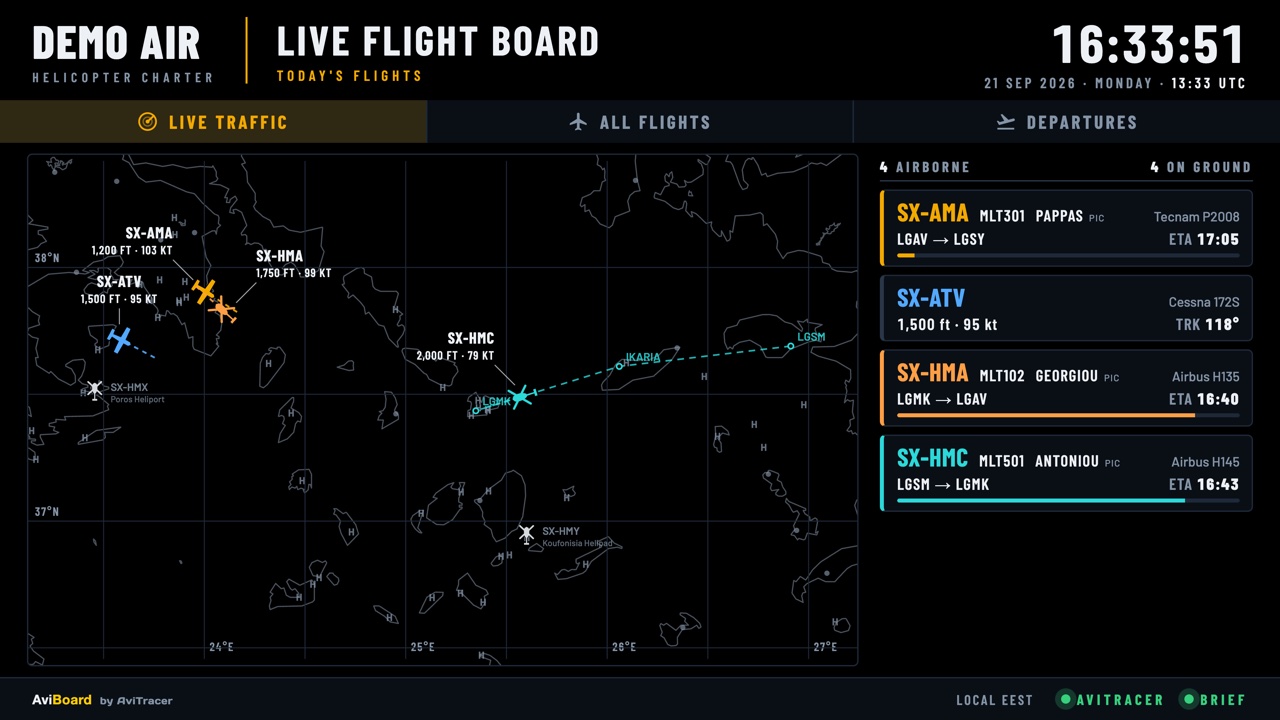
AviBoard turns any TV with a browser into a live flight board for your base. Connect your BRIEF account and the day's flights, aircraft, crew and times fill in by themselves, each with a live status from AviTracer.
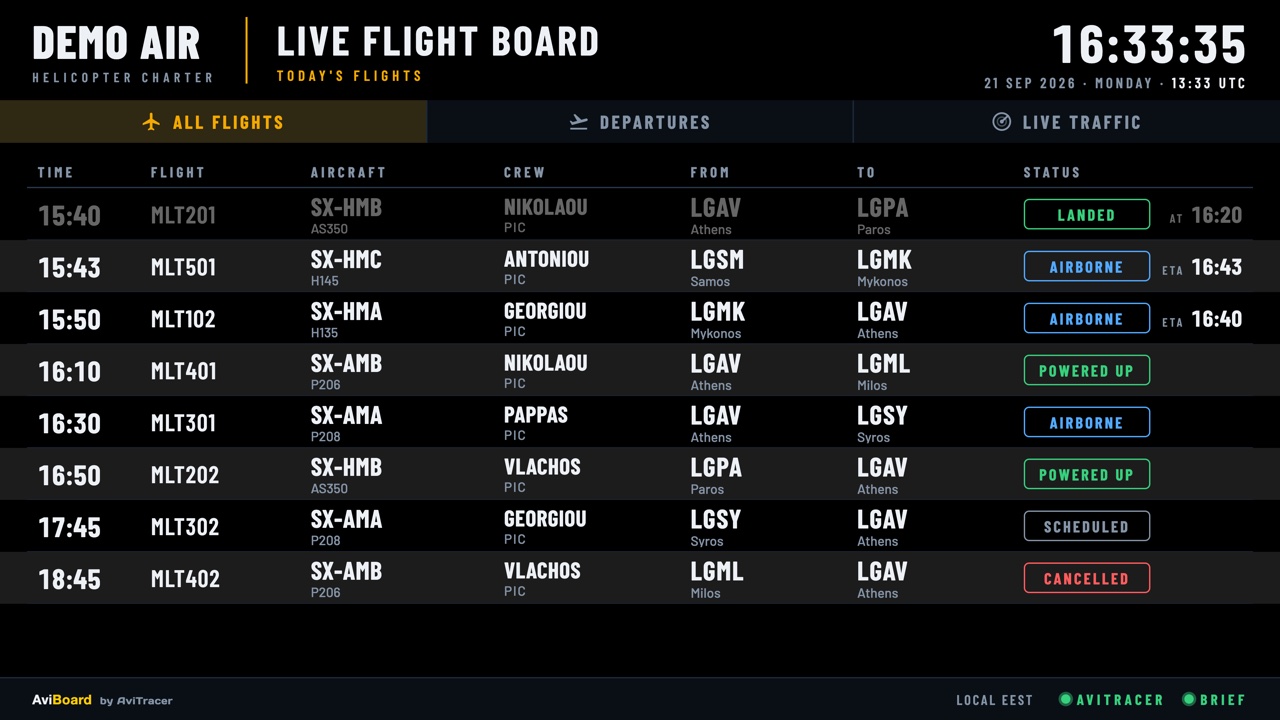
An AviBoard live flight board on a lobby TV: today's flights with time, flight number, aircraft, crew, from and to, and a live status for each
Live flight boardToday's flights with a live status for each one: landed, airborne with ETA, powered up, scheduled or cancelled.
The AviBoard live traffic page: a map with every airborne aircraft, its altitude and speed, and a card per flight with a live ETA
Live trafficEvery airborne aircraft on the map, with its altitude, speed and ETA.
  • Your logo, your colours on every board
  • Works with BRIEF, AviTracer or both: BRIEF for the day's schedule, AviTracer for live positions
  • No login on the TV: each board opens from its own private link

Ready for your next flight?

Create your free account and plan your first flight in a few minutes.